
Date and Time
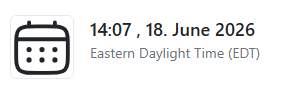
Shows the current Date and/or Time in a defined Timezone.
WARNING
There are only additional or changed fields described here. The service supports all fields from the base service.
Format
Format how to display the current Time and/or Date.
yaml
options:
  format: 'HH:mm'
Default: "HH:mm:ss, dddd, DD.MM.YYYY"
To keep Waffle leightweight it tokens are inspired by the standard Moment.js / Day.js conventions.
Click to see supported Tokens
- Year:
YYYY(2026)YY(26)
- Month:
MMMM(January)MMM(Jan)MM(01-12)M(1-12)
- Day:
DD(01-31)D(1-31)
- Weekday:
dddd(Monday)ddd(Mon)
- Time (24h):
HH(00-23)H(0-23)
- Minute:
mm(00-59)m(0-59)
- Second:
ss(00-59)s(0-59)
Time Zone
Set a specific timezone to display the local time for that region.
yaml
options:
  timezone: America/New_York
Default: Your system's default timezone.
Note
Waffle uses the tz database for valid timezone names (e.g., Europe/Berlin, Asia/Tokyo ).
INFO
You can overwrite the Time zone by using a description
Examples
Base
yaml
- title: Date
  type: date-and-time
  options:
    format: 'HH:mm, DD. dddd YYYY'
    timezone: Europe/Berlin
With a custom description
yaml
- title: Date
  type: date-and-time
  description: Current Time in New York!
  options:
    format: 'HH:mm'
    timezone: America/New_York