
Getting Started
Welcome! First of all thanks for choosing Waffle as your Homepage. Here you will learn how to install Waffle and create your first service
Installation
To run it I will use Docker Compose. It's the easiest way to get Waffle.
Docker Compose
I recommend using this docker-compose.yml:
services:
  waffle:
    image: ghcr.io/danielvici/waffle
    restart: unless-stopped
    container_name: Waffle
    ports:
      - '3000:3000'
    volumes:
      - ./config.yml:/app/data/config.yml
      # - /icons:/app/public/icons # Uncomment if you want to use your own icons.
      # - /favicons:/app/public/favicons # See Favicons for more information
TIP
If you want the file directly get it here.
Config File
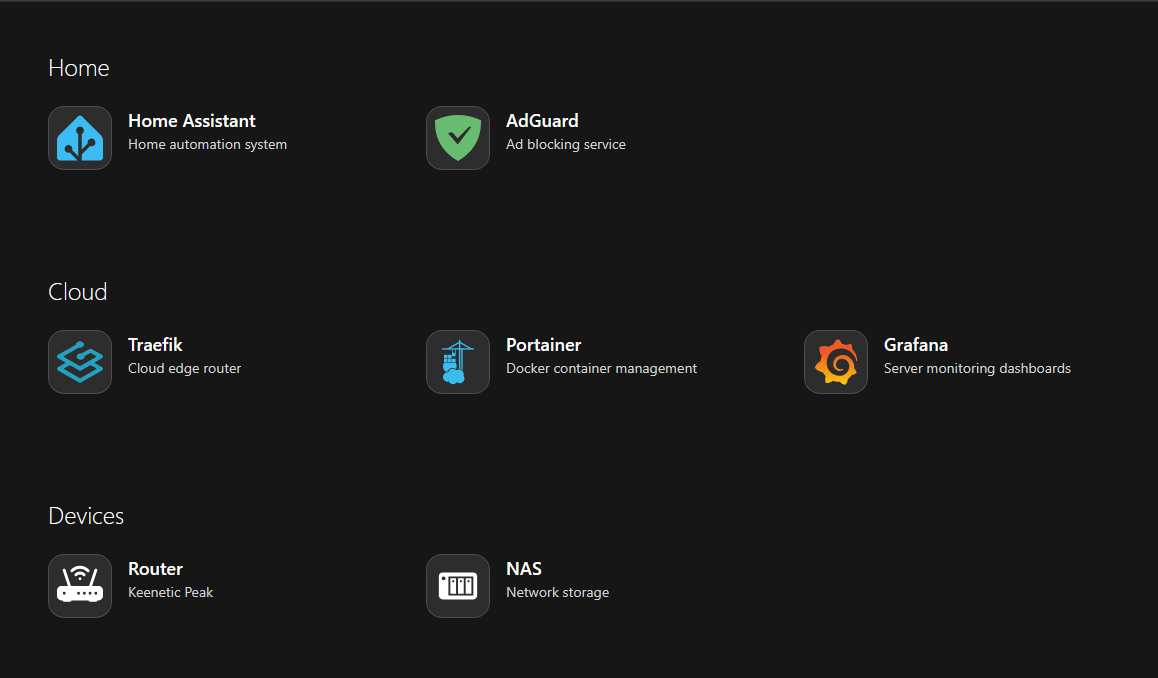
Now you need a config.yml. I will use the following one:
To find out how to customize your Homepage go to Configuration
title: My Home Page
services:
  Home:
    - title: Home Assistant
      description: Home automation system
      link: '#'
      icon:
        name: simple-icons:homeassistant
        wrap: true
        color: '#3dbcf3'
    - title: AdGuard
      description: Ad blocking service
      link: '#'
      icon:
        name: simple-icons:adguard
        wrap: true
        color: '#68bc71'

  Cloud:
    - title: Traefik
      description: Cloud edge router
      link: '#'
      icon:
        name: devicon:traefikproxy
        wrap: true
    - title: Portainer
      description: Docker container management
      link: '#'
      icon:
        name: devicon:portainer
        wrap: true
    - title: Grafana
      description: Server monitoring dashboards
      link: '#'
      icon:
        name: logos:grafana
        wrap: true

  Devices:
    - title: Router
      description: Keenetic Peak
      link: '#'
      icon:
        name: bi:router-fill
        wrap: true
    - title: NAS
      description: Network storage
      link: '#'
      icon:
        name: mdi:nas
        wrap: true
TIP
If you want the file directly get it here.
Place your config.yml in the same folder as your docker-compose.yml
Run Container
Now you can start the container. To do this execute the following command in the same folder as the docker-compose.yml and your config.yml:
sudo docker compose up -ddocker compose up -ddocker compose up -dPost Install
Great! Your Homepage is now ready to use!
Access it via http://<your-machine-ip>:3000.
The site should look like this (if you chose to use the example config.yml):
Enjoy using Waffle!
TIP
Want to learn more how to customize your Homepage? Learn more